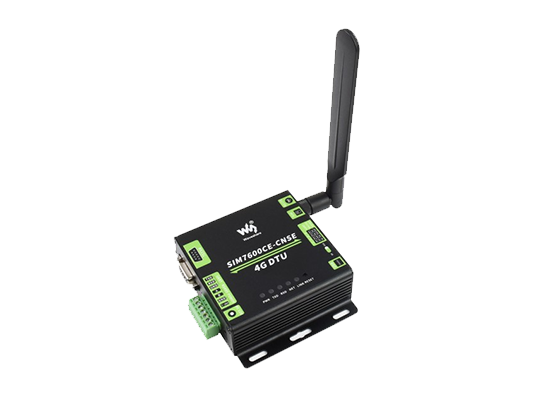
DTU

DTU

DTU(Data Transfer Unit)是专门用于将来自于设备端的串口数据通过无线通信网络传送至 IoT 平台的无线终端设备

  • 广泛应用于水利水电、矿产资源开发、消防安全、管网铺设等各个领域
  • 支持阿里、腾讯、Onenet、MQTT、TCP等多种 IoT 平台
  • 支持本地和远程参数配置
  • 支持OTA升级
  • 支持数据离线存储
  • 开发资源
  • 快速上手
  • 软件设计

本文档列出了 EG912U DTU 所需的硬件资源和相关文档。

开发板和模组型号的介绍

型号:EG912U 核心板

配件资源

  • LTE 天线
  • Nano Sim 卡
  • Mini USB 数据线

开发工具

  • QPYcom - QuecPython 调试工具
    • 版本:V3.9.0
    • 下载 QPYcom
  • QCOM - 串口调试工具

  • VSCode - 代码编辑器

  • 固件版本: QPY_OCPU_BETA0002_EG912U_GLAA_FW

实验源码

  • 版本:v1.0.0

  • 从 Github 仓库获取源代码步骤如下:

    git clone https://github.com/QuecPython/solution-simple-DTU
    cd solution-simple-DTU

基于TCP协议设备开发

修改配置文件

工程配置文件路径:code/dtu_config.json

基于 TCP 私有服务器数据透传做如下配置:

打开 TCP 服务器 :http://tt.ai-thinker.com:8000/ttcloud

默认system_config.cloud配置项定义为"tcp"即 TCP 透传模式,系统会自行读取socket_private_cloud_config配置项。

{
   "system_config": {
       "cloud": "tcp"  # The tcp transparent mode is configured by default
   }
}

本实验采用 TCP 透传模式,用户需根据实际情况设置socket_private_cloud_config配置项中的 TCP 服务器域名(domain)和端口(port)。

{
   "socket_private_cloud_config": {
       "domain": "36.137.226.30",  # ip
       "port": 42298,  # port number
       "timeout": 5,  # time-out period (unit: s)
       "keep_alive": 1  # heartbeat cycle (unit: s)
   }
}

uart_config配置项是串口配置参数,默认是根据当前实验开发板做的配置,不可更改。如用户采用其他开发板则需要根据实际硬件进行配置。

{
    "uart_config": {
        "port": 2,  # Serial port number. Set this parameter based on the actual hardware configuration
        "baudrate": 115200,  # Baud rate
        "bytesize": 8,  # data bits
        "parity": 0,  # parity check
        "stopbits": 1,  # stop bit
        "flowctl": 0,  # fluid control
    }
}

完整配置文件模版如下:

{
    "system_config": {
        "cloud": "tcp"
    },
    "mqtt_private_cloud_config": {
        "server": "mq.tongxinmao.com",
        "port": 18830,
        "client_id": "txm_1682300809",
        "user": "",
        "password": "",
        "clean_session": true,
        "qos": 0,
        "keepalive": 60,
        "subscribe": {"down": "/public/TEST/down"},
        "publish": {"up":  "/public/TEST/up"}
    },
   "socket_private_cloud_config": { 
        "ip_type":"IPv4",
        "domain": "36.137.226.30",
        "port": "42298",
        "keep_alive": 1
    },
    "uart_config": {
        "port": 2,
        "baudrate": 115200,
        "bytesize": 8,
        "parity": 0,
        "stopbits": 1,
        "flowctl": 0,
    }
}

参数说明:

  • system_config.config: 指定当前使用的私有云类型。目前支持tcp和mqtt。
  • mqtt_private_cloud_config: MQTT私有云配置。
  • socket_private_cloud_config: tcp私有云配置。
  • uart_config:串口参数配置。

脚本导入并运行

下载安装QPYCom工具后使用该工具下载脚本至 QuecPython 模组。

💡Tips

QPYCom 安装和使用教程 :https://developer.quectel.com/doc/quecpython/Application_guide/zh/dev-tools/QPYcom/index.html

业务调试

程序运行后,在 REPL 交互页面可以看到日志输出如下图所示。

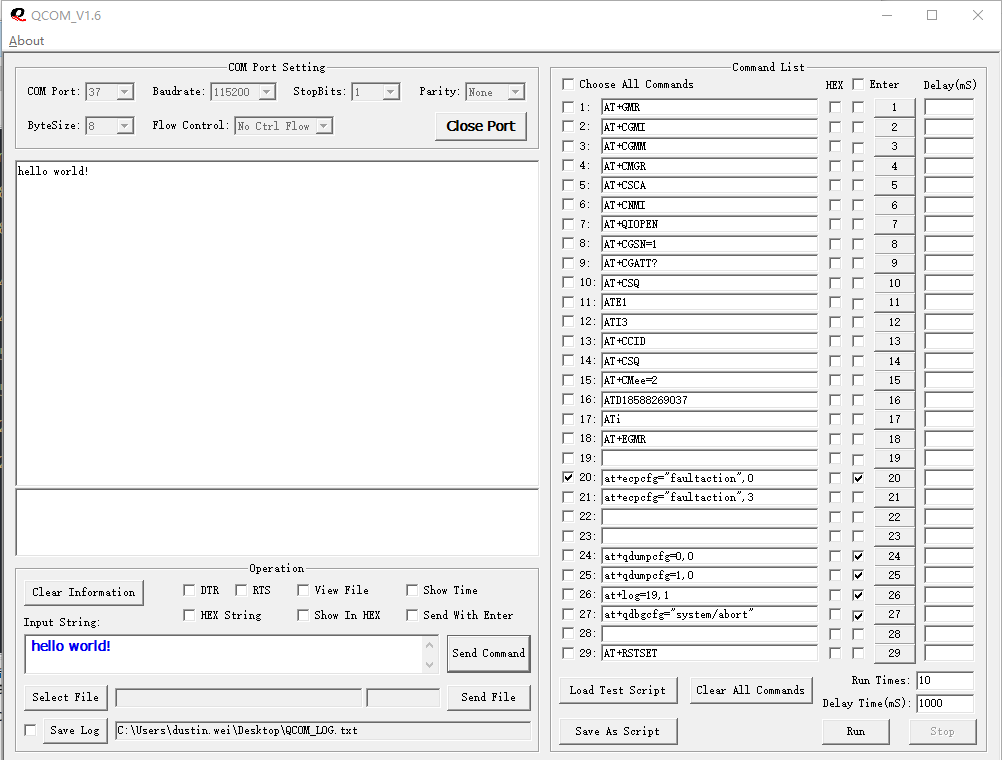
左侧图示,我们使用 QCOM 模拟 MCU 打开用于透传的模组串口(即 USB 转 TTL 模块对应的 COM 口)。

右侧图示,REPL 交互口输出的模组日志。

使用串口工具 QCOM 模拟 MCU 串口上行数据,通过 DTU 透传至 TCP 回显服务器,再由回显服务器将相同数据通过 DTU 下行透传至 QCOM。
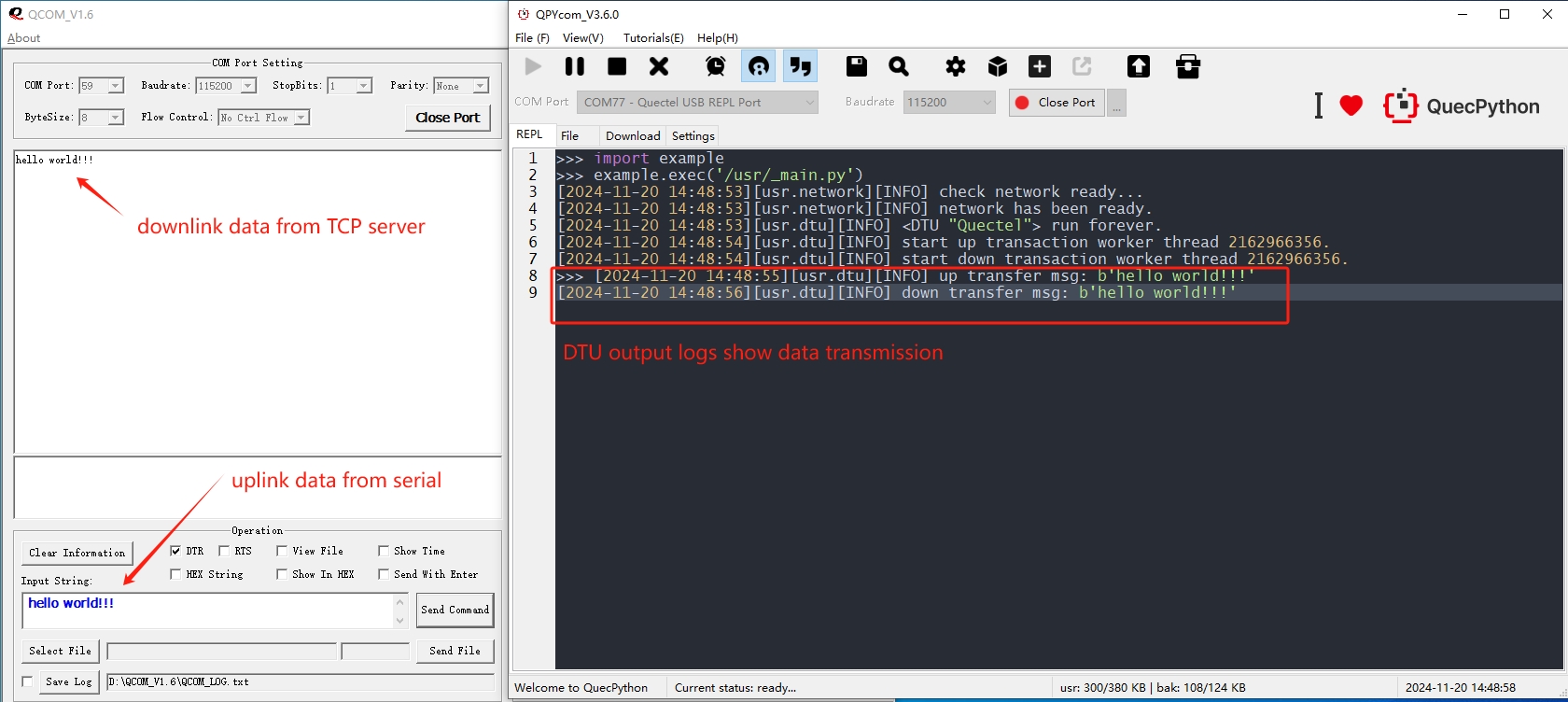
该案例中采用的是 TCP 回显服务器,所以 QCOM 上行数据,经过 DTU 透传至 TCP 服务器接收到之后会立即按原路径下行。

基于MQTT协议设备开发

修改配置文件

工程配置文件路径:code/dtu_config.json

基于 TCP 私有服务器数据透传做如下配置:

  • 默认 system_config.cloud 配置项定义为 "tcp" 即 TCP 透传模式,系统会自行读取 socket_private_cloud_config 配置项。 此处改为 mqtt 协议模式。

    {
       "system_config": {
           "cloud": "mqtt"  # The mqtt transparent transmission mode is configured by default
       }
    }
    
  • 本实验采用 MQTT 透传模式,用户需根据实际情况设置 mqtt_private_cloud_config 配置项中的 MQTT 服务器域名(server)、端口(port)、客户端id(client_id)以及订阅和发布主题等参数,如下。

    {
       "mqtt_private_cloud_config": {
           "server": "mq.tongxinmao.com",
           "port": 18830,
           "client_id": "txm_1682300809",
           "user": "",
           "password": "",
           "clean_session": true,
           "qos": 0,
           "keepalive": 60,
           "subscribe": {"down": "/public/TEST/down"},  # Downlink data transparent topic
           "publish": {"up":  "/public/TEST/up"}  # Uplink data transparent transmission topic
       }
    }
    
  • uart_config 配置项是串口配置参数,默认是根据当前实验开发板做的配置,不可更改。如用户采用其他开发板则需要根据实际硬件进行配置。

{
    "uart_config": {
        "port": 2,  # Serial port number. Set this parameter based on the actual hardware configuration
        "baudrate": 115200,  # Baud rate
        "bytesize": 8,  # data bits
        "parity": 0,  # Parity check
        "stopbits": 1,  # stop bit
        "flowctl": 0,  # fluid control

        }
    }
}

完整配置文件模版如下:

{
    "system_config": {
        "cloud": "tcp"
    },
    "mqtt_private_cloud_config": {
        "server": "mq.tongxinmao.com",
        "port": 18830,
        "client_id": "txm_1682300809",
        "user": "",
        "password": "",
        "clean_session": true,
        "qos": 0,
        "keepalive": 60,
        "subscribe": {"down": "/public/TEST/down"},
        "publish": {"up":  "/public/TEST/up"}
    },
    "socket_private_cloud_config": {
        "domain": "112.31.84.164",
        "port": 8305,
        "timeout": 5,
        "keep_alive": 5
    },
    "uart_config": {
        "port": 2,
        "baudrate": 115200,
        "bytesize": 8,
        "parity": 0,
        "stopbits": 1,
        "flowctl": 0,
        "rs485_config": {
        	"gpio_num": 28,
            "direction": 0
        }
    }
}

参数说明:

  • system_config.config: 指定当前使用的私有云类型。目前支持tcp和mqtt。
  • mqtt_private_cloud_config: MQTT私有云配置。
  • socket_private_cloud_config: tcp私有云配置。
  • uart_config:串口参数配置。

脚本导入并运行

下载安装 QPYCom 工具后使用该工具下载脚本至 QuecPython 模组。

💡 Tips

QPYCom 安装和使用教程:https://developer.quectel.com/doc/quecpython/Application_guide/zh/dev-tools/QPYcom/index.html

业务调试

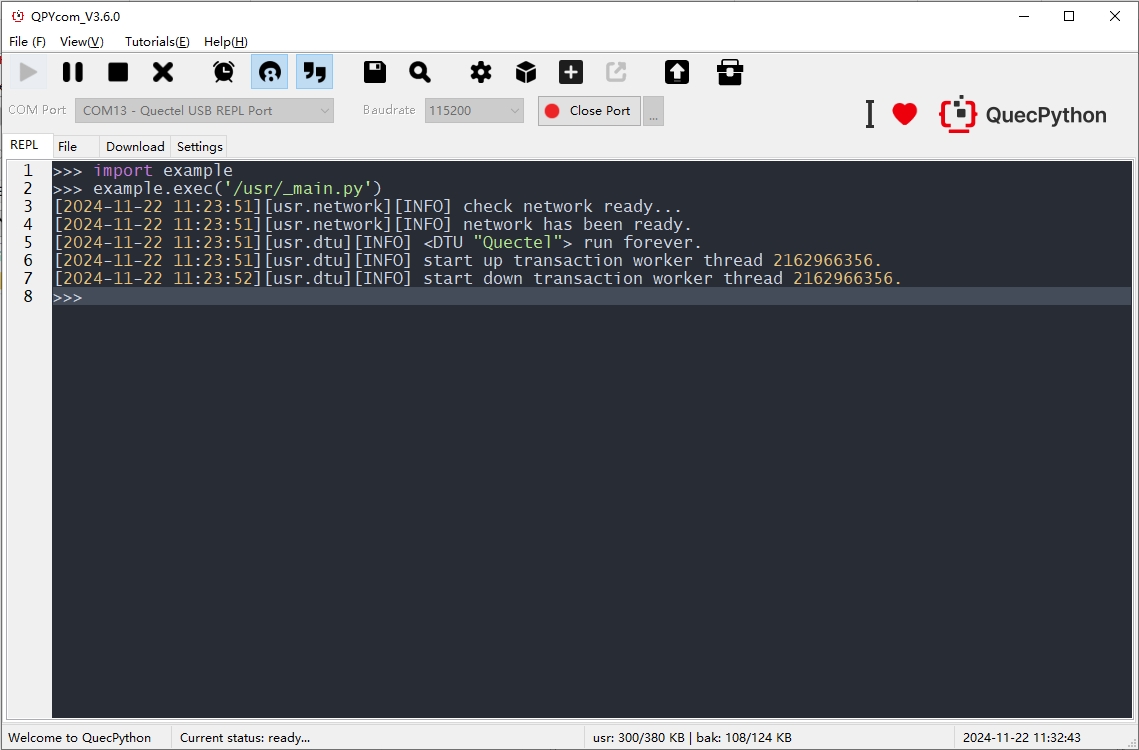
查看 REPL 交互口日志

程序运行后,在 REPL 交互页面可以看到日志输出如下图所示。 DTU服务中有2个线程处理数据,一个是用于检测读取串口数据并转发数据给云端,一个是检测云端下行数据透传给串口,如下图所示。 
上行数据透传

使用串口调试工具模拟mcu给模组发送上行数据。

  • Input String输入框中输入hello world!字符串。
  • 点击Send Command按钮通过串口发送数据。

DTU接收串口数据,直接透传至mqtt云端。
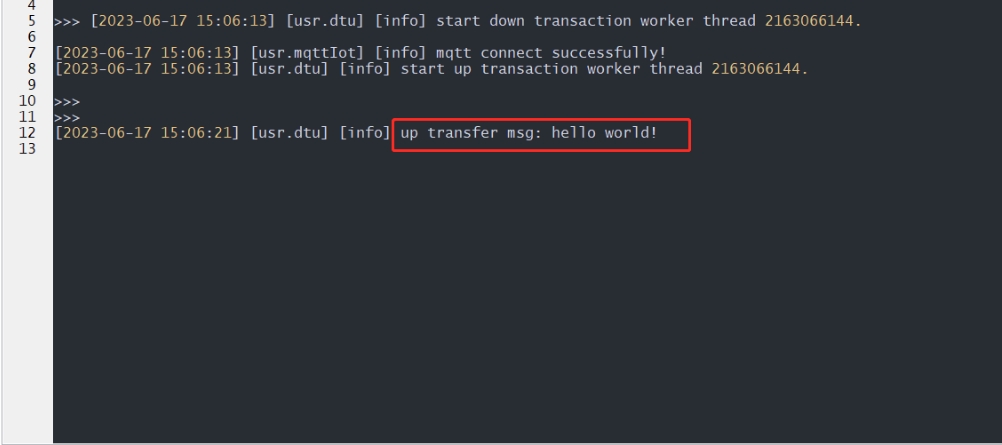
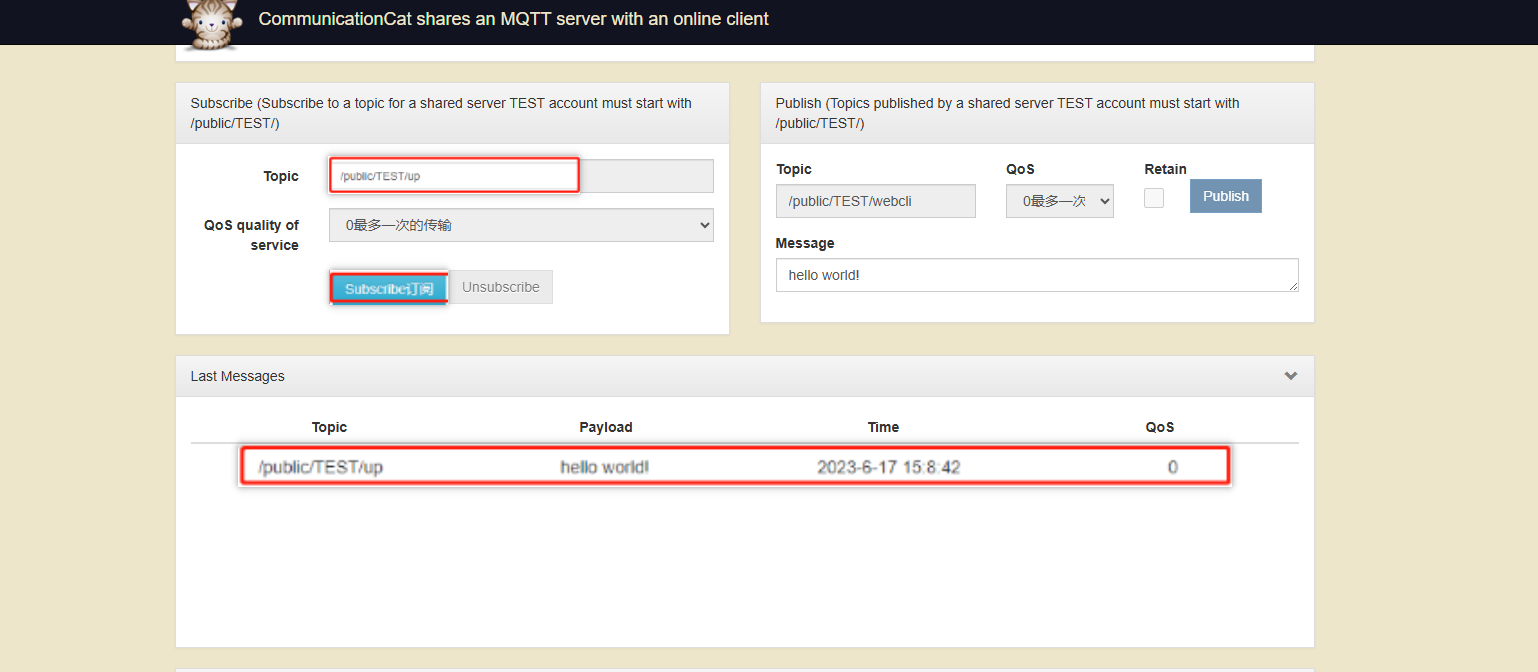
云端接收上行数据日志

ps:通信猫云平台仅用于测试,可根据实际需要更换云平台

1

下行数据透传

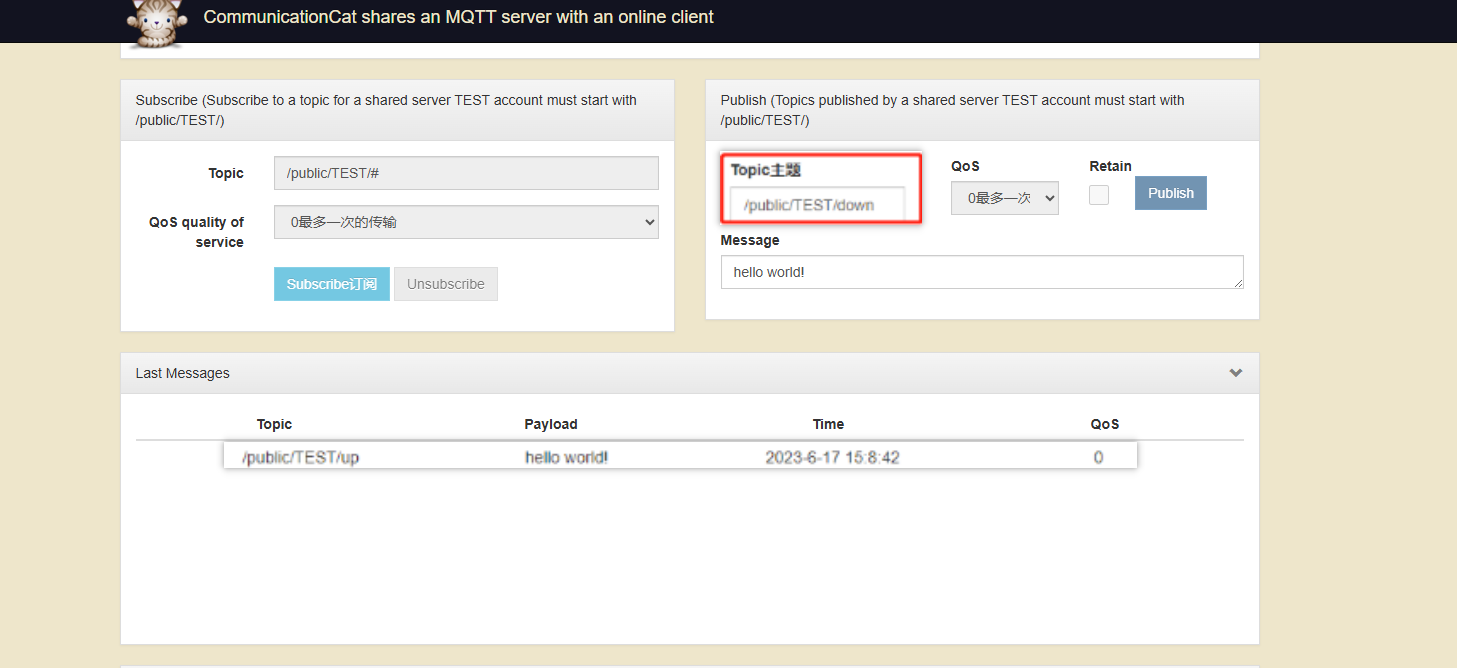
云端发送下行数据。

  • 设置云端下行数据主题(与DTU应用配置的订阅主题一致)。
  • 输入下行数据。
  • 发布。

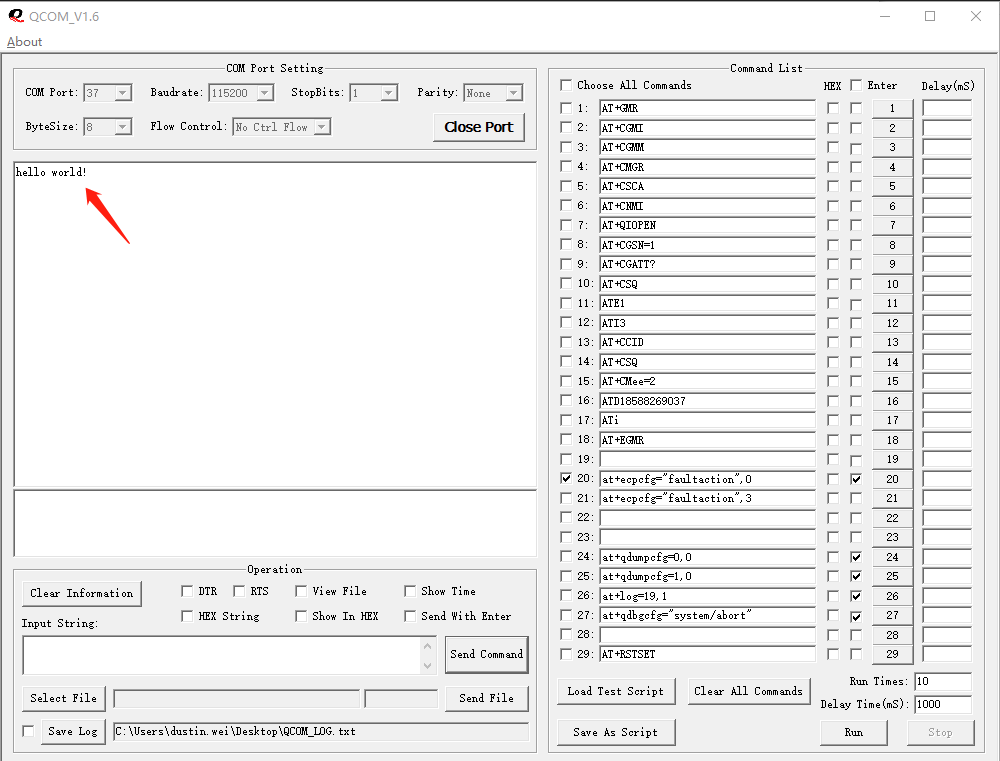
使用QCOM观察串行调试工具,模拟mcu接收模块下行数据。

应用流程图

一般了解一个程序代码大多从启动部分开始,这里也采取这种方式,先寻找程序的启动源头。本例程,一般的程序启动顺序如下图所示:
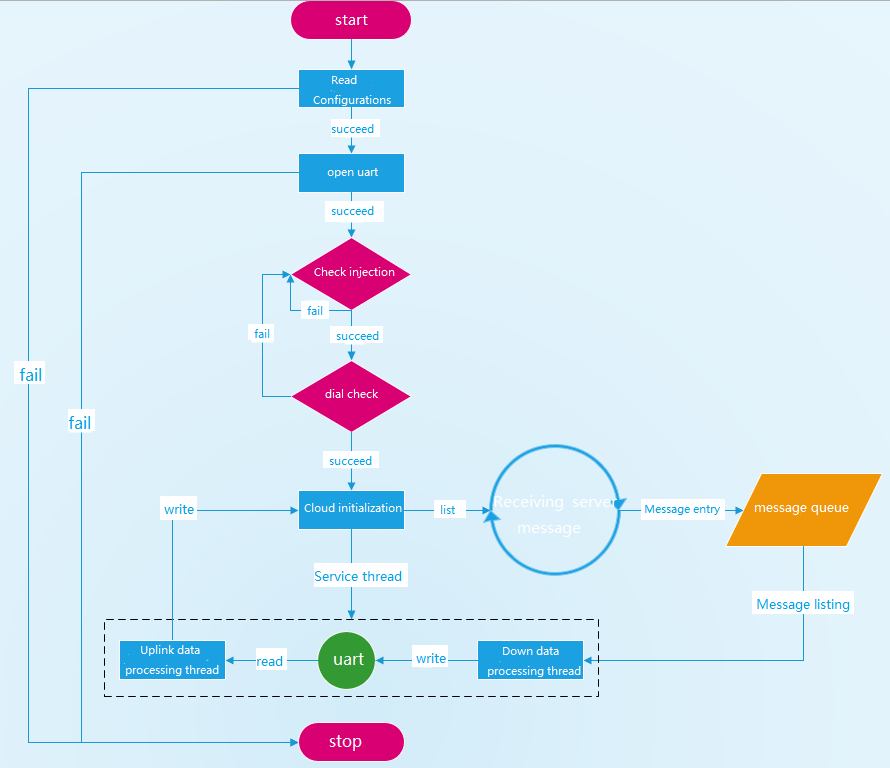
整体上业务可以总结为如下流程:

  1. 启动喂狗线程(华系列 4G DTU 载有硬件狗)
  2. 初始化 DTU 对象后,读取系统配置
  3. 初始化串口外设
  4. 检查网络状态
  5. 初始化云端配置和消息队列
  6. 启动数据上下、下行业务线程

💡 基本原理:本 DTU 采用 多线程 + 消息队列 实现串口和云端数据的上下行转发。其中,上行线程(Uplink data thread)用于读取串口数据并发送至云端;下行线程(Downlink data thread)读取消息队列中的云端数据通过串口转发;消息队列用于缓存云端的下行数据。

目录结构

  • usr
    • _main.py:主脚本
    • dtu_config.json:配置文件
    • dtu.py:DTU 模型对象
    • logging.py:日志模块
    • cloud_abc.py:云对象模型抽象基类
    • mqttIot.py:Mqtt 云对象模型实现
    • network.py:网络
    • serial.py:串口模型对象实现
    • socketIot.py:Socket 云对象模型实现
    • threading.py:线程、队列和互斥锁
    • utils.py:工具类

API 说明

对象模型

本方案中定义了多个对象模型,其中主要有 DTU 对象模型、云对象模型(CloudABS)和串口对象模型(Serial)。

DTU对象模型

DTU类在 dtu.py 模块中定义,主要用于初始化串行端口、云以及上下游数据服务。

实现MQTT协议的云通信功能,提供连接、订阅、发布和监控功能。云对象初始化如下:

self.cloud = MqttIot(
    mqtt_config['client_id'],
    mqtt_config['server'],
    port=mqtt_config['port'],
    user=mqtt_config['user'],
    password=mqtt_config['password'],
    keepalive=mqtt_config['keepalive'],
    clean_session=mqtt_config['clean_session'],
    qos=mqtt_config['qos'],
    subscribe_topic=mqtt_config['subscribe'],
    publish_topic=mqtt_config['publish'],
    queue=self.queue,
    error_trans=True
)

实现TCP/UDP协议的云通信功能,提供连接、发送、接收和监听功能。socket对象初始化如下:

self.cloud = SocketIot(
    ip_type=socket_config['ip_type'],
    keep_alive=socket_config['keep_alive'],
    domain=socket_config['domain'],
    port=socket_config['port'],
    queue=self.queue,
    error_trans=True
)

up_transaction_handler 方法: 上行数据传输业务线程的入口函数。

down_transaction_handler 方法: 行数据传输业务线程的入口函数。

def down_transaction_handler(self):
    while True:
        topic, data = self.cloud.recv()
        logger.info('down transfer msg: {}'.format(data))
        self.serial.write(data)
def up_transaction_handler(self):
    while True:
        data = self.serial.read(1024, timeout=100)
        if data:
            logger.info('up transfer msg: {}'.format(data))
            self.cloud.send(data)

run方法:启动业务操作,包括基于配置文件创建串行端口和云对象,以及为上下游行业创建业务数据处理线程。

Serial object model

  • In the serial.py module, the serial port model class Serial is defined. This class is mainly used to implement the read and write operations of the serial port. The main interfaces include:Serial
    • __init__: Serial port initialization.
    • open:Open the serial port.
    • close:Shut down the serial port.
    • write:Serial port write.
    • read:Serial port read.

Example of serial port::

from usr.serial import Serial

# init Serial object
s = Serial(port=2, baudrate=115200, bytesize=8, parity=0, stopbits=1, flowctl=0, rs485_config=None)
# open serial
s.open()
# serial write method
s.write(b"hello world!")

# serial read method
recv_data = s.read()
print(recv_data)

业务代码讲解

数传业务主要在 DTU 类(dtu.py)中实现,该类主要用于管理串口、云、以及数据的上下行业务。

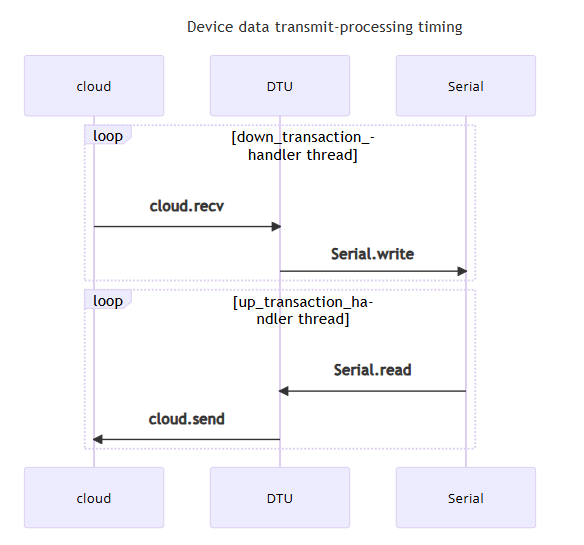
DTU 对象在主脚本中通过调用 run 方法来开启整个 DTU 业务,其中该方法主要用于创建并运行两个线程,分别是上行数据处理线程(线程工作函数是 up_transaction_handler)和下行数据处理线程(线程工作函数是 down_transaction_handler)。在线程函数中分别通过两个 property 属性来获取对应的串口对象和云对象。其中串口对象属性是 serial,线程在调用该属性时即刻创建并打开配置的串口对象提供读写接口。其中云对象属性是 cloud,线程在调用该属性时即刻创建并连云对象提供接收和发送接口。

函数调用时序图:
class DTU(object):

    # ...
    def up_transaction_handler(self):
        while True:
            data = self.serial.read(1024, timeout=100)
            if data:
                logger.info('up transfer msg: {}'.format(data))
                self.cloud.send(data)
    # ...

up_transaction_handler函数按照 1KB 的 buffer 读取串口数据(用户可以自行调整buffer大小),并格式化消息后通过 CloudABC.send 接口发送数据至云端。用户继承 CloudABC 并自定义云对象并实现 。

下行数据处理线程函数 down_transaction_handler 实现如下:

class DTU(object):
    # ...
    def down_transaction_handler(self):
        while True:
            topic, data = self.cloud.recv()
            logger.info('down transfer msg: {}'.format(data))
            self.serial.write(data)
    # ...

down_transaction_handler 函数通过调用 CloudABC.recv 来获取下行消息,并通过 Serial.write 转发消息。

沟通无界,服务无限

了解更多关于移远公司、产品和技术支持的信息。